
Dashboard
The top of the page shows key metrics for your quarantine release operations.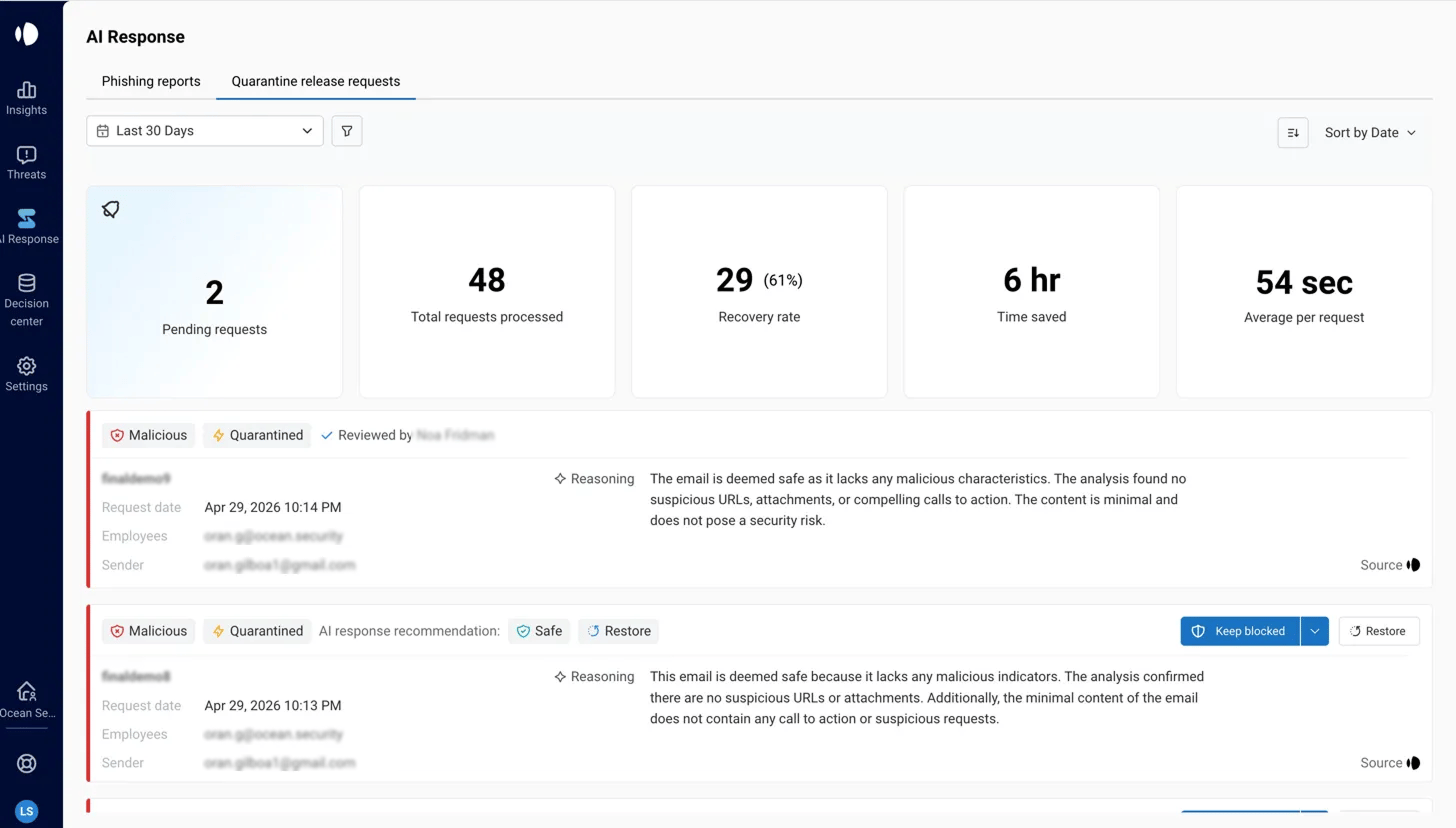
| Metric | What it shows |
|---|---|
| Pending requests | Release requests currently awaiting a SOC decision |
| Total requests processed | Total requests handled in the selected time period |
| Recovery rate | Percentage of requests that resulted in the email being released |
| Time saved | Estimated time saved through automated AI reviews |
| Average per request | Mean time from request creation to resolution |
The Request List
Below the dashboard, requests are listed in a filterable view. Each card shows:- Verdict — Original classification (Spam or Malicious) & Action
- Status — Quarantined, Pending, or Resolved
- Reasoning — Ocean AI Agent’s explanation of the classification
Reviewing a Request
Click any request card to open the full details panel.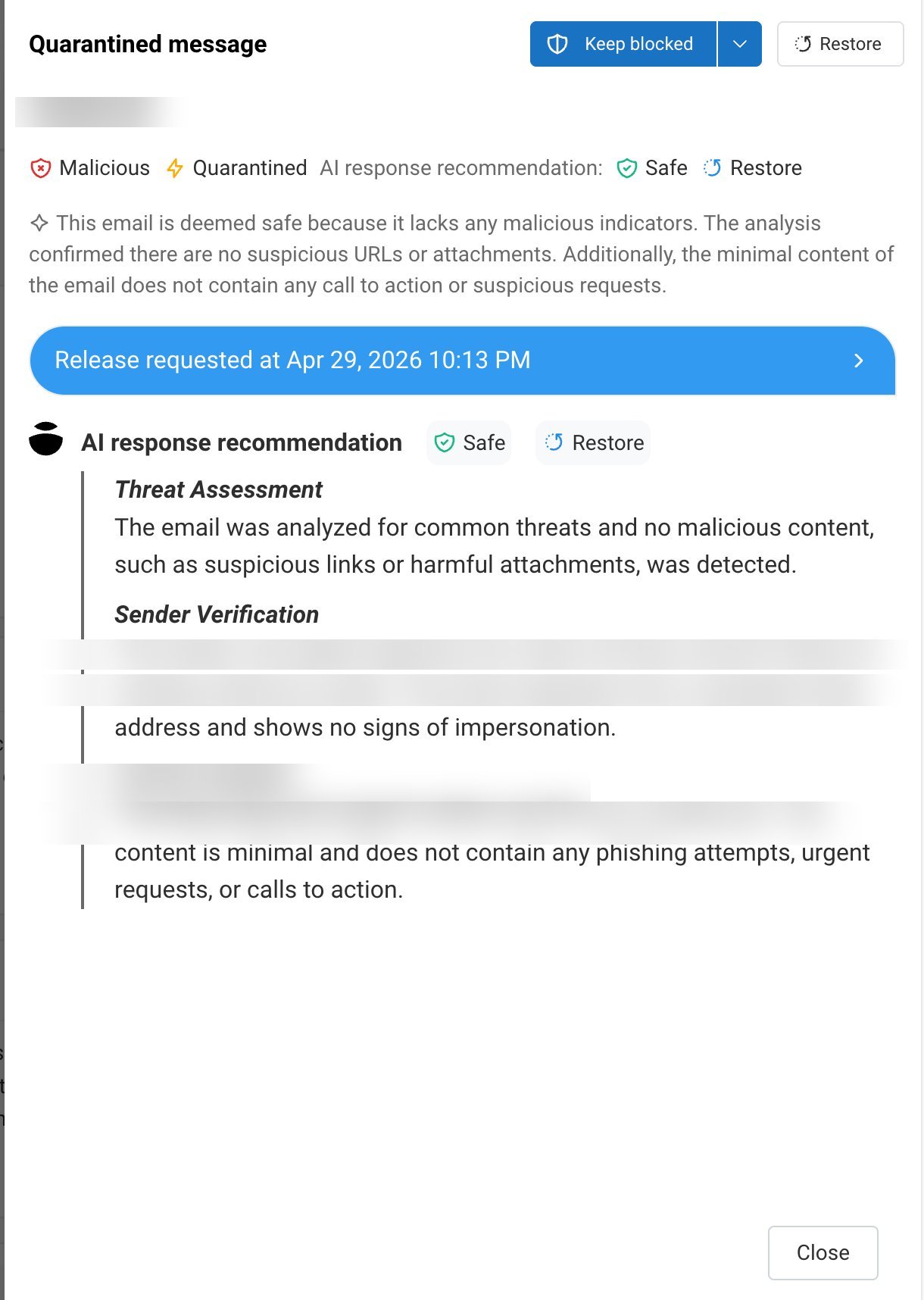
- Complete email metadata (subject, sender, recipient, timestamp)
- The original email
- A structured AI analysis broken down into Threat Assessment, Sender Verification, and Content Analysis
- Ocean AI Agents’s recommendation (Safe / Restore or Keep blocked)
- Action buttons to resolve the request
Taking Action
Restore
Click Restore to release the email to the employee’s inbox. The email is marked as Safe, restored from quarantine, and the employee receives the email in his inbox.Keep Blocked
Click Keep Blocked to deny the request and keep the email quarantined. Use the dropdown to optionally reclassify the verdict:
| Reclassification | When to use |
|---|---|
| As malicious | Confirm the email is a threat (default) |
| As spam | Downgrade the verdict — the email is unwanted but not a security threat |
After a Decision
Released emails- Restored to the employee’s inbox and marked as Safe
- Action logged with reviewer identity and timestamp
- Remain quarantined with the original or updated verdict
- Employee receives a notification with the AI’s explanation of why the email was not released
- Action logged for audit purposes
All decisions — whether made by SOC analysts or Ocean AI Agents — are recorded with full context: reviewer identity, timestamp, original verdict, final verdict, and any notifications sent.
Frequently Asked Questions
What's the difference between AI decision and SOC approval?
What's the difference between AI decision and SOC approval?
With AI decision, Ocean AI Agent reviews the request and makes the final call autonomously — no SOC action required. With SOC approval, Ocean AI Agent reviews the request and surfaces a recommendation, but your SOC team approves or denies it. Both modes notify the employee if the email is not released.
Can I change a decision after it's been made?
Can I change a decision after it's been made?
Yes. You can always update an email’s verdict or remediation status via the Decision Center, regardless of how the release request was resolved.
How quickly are released emails restored?
How quickly are released emails restored?
Released emails are typically restored to the employee’s inbox within seconds of the decision.
Do employees see who reviewed their request?
Do employees see who reviewed their request?
Employees are notified of the outcome but do not see the reviewer’s identity. Whether the review was done by AI Agent or SOC is visible only within the Ocean portal.
What if an employee requests release for a genuinely malicious email?
What if an employee requests release for a genuinely malicious email?
If Ocean AI Agent confirms the email is malicious, the request is denied and the email stays quarantined. The employee receives a detailed explanation of the threat indicators — this also serves as a security awareness touchpoint.